
We may earn money or products from the companies mentioned in this post.
The creator of SOL: The Last Imperium says the first playable build took 24 hours. The early browser version combines on-foot action and vehicles, and the creator’s account describes how Claude Opus 5.5, Tripo, Blender, and Three.js fit together. This is a look at the initial prototype and the workflow behind it. The creator’s 24-hour estimate is self-reported, and the demo available today may include later work.
This article contains a Meshy affiliate link. We may earn a commission if you buy through it. The creator reported using Tripo for this build.
Open the early browser build on Tesana. Start on a desktop if you want to see how the on-foot and vehicle sections fit together.
What the creator says was built in a day
On November 5, the creator, who posts as @Rubzem, shared footage and described a browser shooter featuring infantry combat, vehicles, and large enemies. The post says the initial game, art, music, sound effects, and animation were made with AI. It names Three.js as the browser technology and credits Tripo for models and Claude Opus 5.5 for work with Blender. A copy of the launch post preserves the original description.
The build caught attention beyond the original post. Game directory Amusehall logged 1,463 likes on that X post as of November 16 and catalogued the Tesana version as an early test build. The social count measures interest in the post. We have no public sales figures, play totals, or production cost for the project.
What each tool did
| Tool | Role in the reported workflow |
|---|---|
| Claude Opus 5.5 | The original post credits it for AI-assisted development and refinement work with Blender. |
| Tripo | Generated 3D assets including characters, vehicles, and monuments. |
| Blender | The environment used to refine the generated models. |
| Three.js | The JavaScript 3D library behind the browser build. |
If you mainly want to experiment with the prop step, Meshy is another tool you could test on one small asset. Our Meshy vs Tripo comparison covers the practical checks, including export formats and how much cleanup a mesh might need before it fits your game.
Why the Blender step matters
A generated model has to do a job inside the game. For a vehicle, that could mean lining up with the player’s view, clearing a doorway, and behaving consistently when the game loads. Getting an attractive mesh is one milestone. Working out its scale, orientation, collision shape, and how it moves is a separate milestone you can test in context.
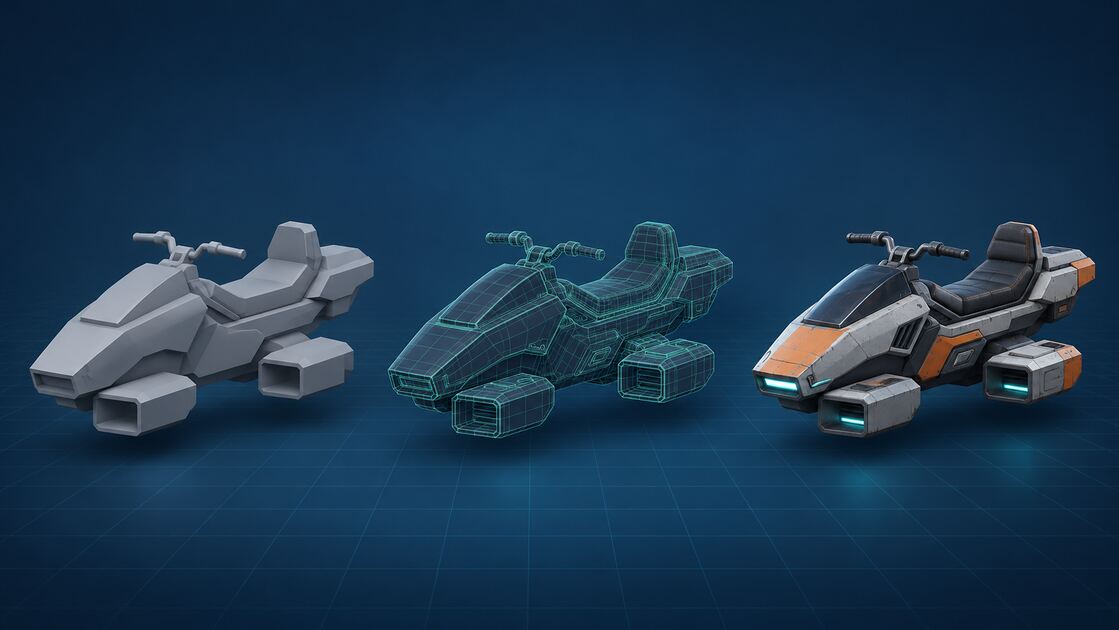
The creator later described a soldier and hoverbike pass involving Tripo, Blender, and Claude Fable 5.2. That was a follow-up to the original post. Opus 5.5 is the model credited in the 24-hour account. The creator’s later workflow shows how the tool mix changed between builds.
What to borrow for a first game
Try the workflow with a much smaller goal. Use rough shapes to make one playable encounter first. Add one original prop that the player can approach and use, then bring it from the generator into the editor and test it in play mode. If you want a vehicle, make entering, moving, and leaving it work in a tiny test scene before adding custom models and a larger map.
Keep a timestamped build and a short list of what actually worked at the end of the session. Save a new version when you replace assets or add mechanics. That gives you a fair basis for comparing the initial prototype with later improvements, even if the whole project stays a personal experiment.
For a different path to a browser shooter, read How Saltline Was Built in 8 Hours With $550 in API Costs. Its creator reported running one broad prompt through Claude Fable 5.2 and getting a playable small level, with the visuals built in code.